
Experience across approximately $10M in annual revenue, $7M in operating cost, 400+ assets, 70+ customers, and 18 employees shaped how I design product workflows, handoffs, accountability, adoption, operational risk, and dependable execution.
INSPECTABLE PROOF OF APPLIED AI WORKFLOW SYSTEMS & FUNCTIONAL PRODUCT OWNERSHIP
Tomas L. Baca
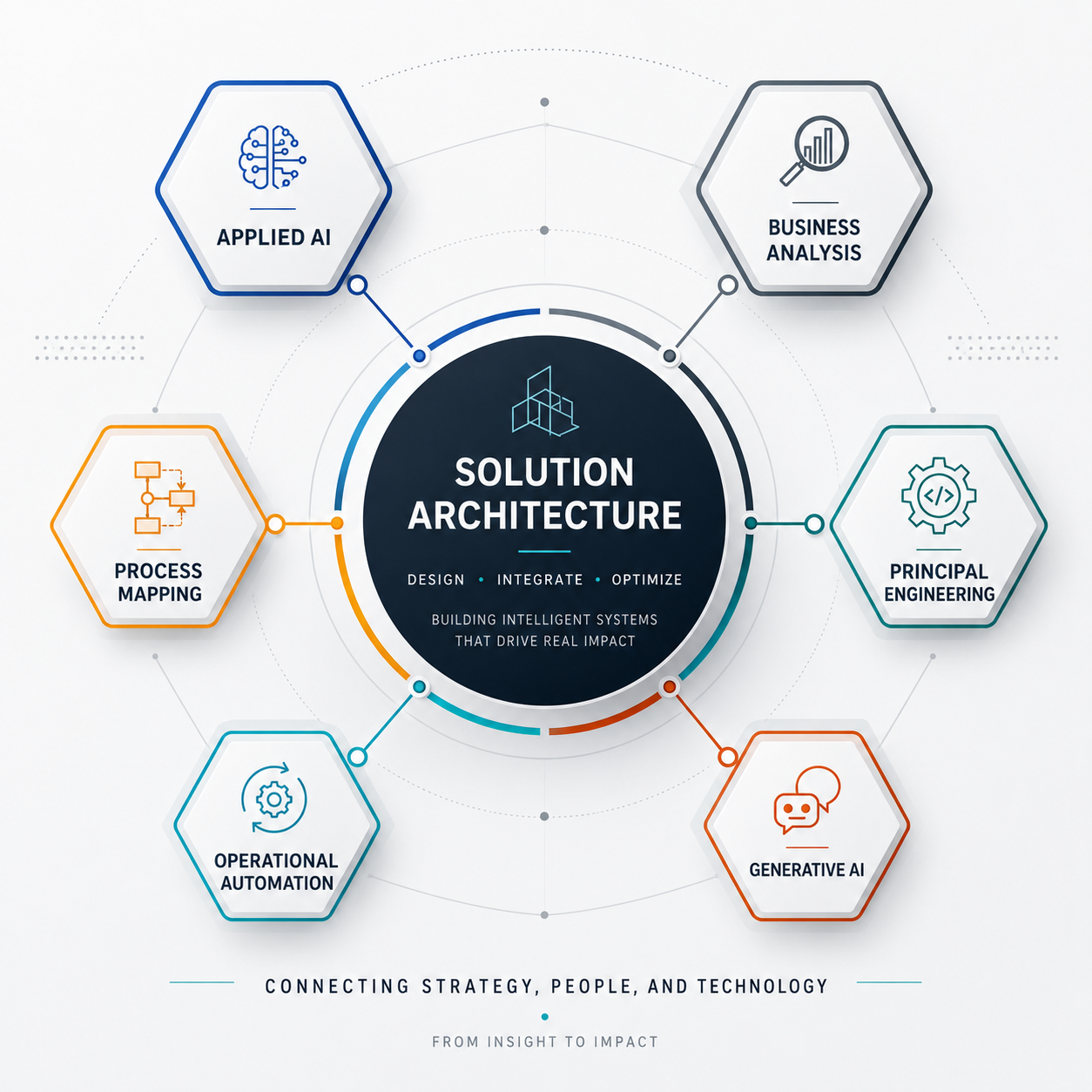
Applied AI Workflow Systems & Operational Automation
I design, engineer, deploy, and direct AI-enabled workflow systems and operational products that turn complex work into usable tools, clear user interactions, structured decisions, and reliable execution.
This portfolio shows the architecture, functional product ownership, implementation direction, testing, validation, failure analysis, and limits behind the work, so hiring teams can inspect what I built, what I directed, how I made decisions, and where the evidence stops.
Role alignment
Where my evidence creates the strongest hiring signal
- Applied AI Workflow Engineer
- AI Workflow Automation Engineer
- Technical Product Owner | Operational Systems
- Product Owner | Workflow and Field Systems
- Automation & Internal Tools Specialist
- Business Systems Analyst | AI / Automation
- AI Workflow Reliability Analyst
Technical Product Ownership / Business Systems
Strongest when the role requires cross-functional product workflow ownership, requirements and UX translation, implementation prioritization, acceptance testing, release-readiness judgment, migration preparation, and clear operational handoffs.
Automation / Internal Tools
Strongest when the role requires practical internal tools built with Google Workspace, Apps Script, Excel/VBA, APIs, approval and reporting workflows, source-data controls, validation, and dependable operational handoffs.
Applied AI Workflow & Reliability
Strongest when the role requires LLM workflow architecture, structured intake, source-confidence controls, staged execution, human validation, prompt-system evaluation, diagnostic recovery, and failure-mode analysis.
AI SYSTEMS EVOLUTION
Generative AI
From prompts to operating environments.
I’ve progressed from session-start instructions into reusable LLM environments that control role, context, intake, constraints, workflow stages, verification, failure handling, and output behavior across ChatGPT and Gemini.
The progression was not simply toward longer prompts. It was toward behavioral architecture.
The systems increasingly incorporated:
- explicit role and mission definition;
- context intake before execution;
- operator-skill calibration;
- constraint handling;
- progressive requirement decomposition;
- staged execution;
- output contracts;
- source-confidence controls;
- uncertainty labeling;
- stop-and-verify behavior;
- human confirmation gates;
- failure-mode analysis;
- diagnostic recovery;
- reusable-pattern extraction;
- runtime drift controls;
- truth-prioritized and anti-sycophancy behavior;
- self-contained instruction design for fresh-chat reuse.
A key architectural shift was treating system instructions as a portable control layer rather than as content bound to one chat or one vendor interface.
The same instruction-design approach was intentionally made usable across LLM platforms. ChatGPT could be used as the design environment for a downstream assistant, while Gemini could host and execute a specialized version of that architecture.
The design pattern increasingly became:
Role Objective Context Constraints Intake Decomposition Controlled Execution Validation Correction Output
This is the foundation underneath the later project work.
Agentic AI
Two forms of autonomy emerged.
I first engineered deterministic workflows that could execute defined operational sequences without step-by-step human control, then advanced into LLM environments with agentic autonomy: interpreting goals, selecting next actions, decomposing work, evaluating state, diagnosing failures, revising strategy, and continuing toward an accepted outcome.
The progression rests on a crucial systems distinction:
Autonomy of execution
Rules, triggers, conditional branches, and service calls execute known operational workflows once activated. This includes event-driven or scheduled processing, conditional routing, status updates, notifications, file retrieval and routing, state updates, and execution logging.
Autonomy of reasoning / strategy selection
The LLM interprets the current context, determines what should happen next, selects or changes a strategy, exposes uncertainty, diagnoses failed approaches, and adapts execution within the governed conversation.
I’ve designed both. Deterministic autonomy delegates execution; agentic autonomy delegates portions of reasoning, action selection, diagnosis, and strategy.
The agentic progression came from workflow behavior, not from simply naming an assistant an agent.
The systems were deliberately designed to perform bounded problem-solving actions inside the conversation, including:
- interpret a high-level goal;
- determine what information is missing;
- choose the next useful question or action;
- decompose work into controlled stages;
- select an implementation path;
- compare alternatives;
- enforce role and workflow boundaries;
- detect when execution is occurring in the wrong state or role;
- surface uncertainty instead of filling gaps with plausible guesses;
- detect failed validation;
- isolate likely root causes;
- change the execution strategy;
- revalidate after correction;
- decide whether to continue, stop, or reassess.
This design evolved further into role-based orchestration.
Different conversational roles could be given different authorities, such as:
- engineering/build execution;
- prompt architecture;
- product reasoning;
- SDET-style observation and evaluation;
- evidence classification;
- portfolio translation;
- system governance and release verification.
The later systems also introduced technical decision authorization: when the evidence and rules already determine the next routine action, the assistant is expected to make that decision rather than return the decision burden to me.
Together, these systems demonstrate an architectural progression from autonomy of execution to autonomy of reasoning and strategy selection. Both remain important: deterministic autonomy handles repeatable operational work, while agentic autonomy handles context-sensitive problem solving and adaptation.
The result is an increasingly agentic interaction model:
Goal State Assessment Action Selection Execution Observation Validation Adaptation Acceptance
Zero-Shot Capability Shifting
One LLM architecture, multiple unfamiliar technical domains.
I’ve learned to change the role, vocabulary, constraints, reasoning procedure, teaching depth, failure model, and output structure around the task without retraining the underlying model.
The recurring technical mechanism is contextual capability adaptation.
Instead of treating each unfamiliar domain as a separate training problem, I engineered the conversational environment around the new domain.
That adaptation included:
- domain-specific role definition;
- operator baseline and skill calibration;
- platform/version constraints;
- terminology adaptation;
- user-interface and workflow assumptions;
- domain-specific failure conditions;
- source hierarchy;
- domain-specific validation checks;
- teaching depth;
- troubleshooting logic;
- response format;
- decision criteria;
- stop conditions.
This allowed the same class of general-purpose LLM to behave differently depending on the current operating context.
A technical assistant could move from:
- software workflow reasoning;
- spreadsheet engineering;
- field-data design;
- geospatial UI concepts;
- Google Workspace automation;
- repository and version-control concepts;
- product and workflow architecture;
without model retraining.
The architecture changes around the task while the underlying model remains the same.
The important operator capability is not memorizing every domain in advance. It is knowing how to construct enough context, control, verification, and interaction structure for the LLM to become useful inside the new domain.
Radical Meta-Learning
The learning system became recursive.
I’ve moved from using AI to learn a domain, to using AI to design specialized AI environments, evaluate their behavior, improve their architecture, and preserve validated knowledge for reuse.
The recursive process became:
Use AI to learn a domain engineer a domain assistant use that assistant to perform work evaluate the system and its output identify failure modes revise the architecture preserve validated knowledge
That progression introduced a meta-layer above ordinary AI-assisted task execution.
I designed LLM environments that could:
- create or improve other instruction systems;
- compare downstream instructions against originating requirements;
- forecast likely runtime behavior;
- identify high-, medium-, and low-leverage behavioral controls;
- detect ambiguity, weak constraints, fake certainty, output drift, and excessive or insufficient questioning;
- audit source-to-output integrity;
- inspect phase compliance;
- observe runtime drift;
- expose silent-failure risk;
- assess reproducibility;
- classify evidence strength;
- separate observed behavior from inference;
- recommend system-level revisions;
- preserve reusable patterns and validated findings.
A second major shift was LLM environments serving as design layers for specialized environments.
One conversational system could be used to:
- analyze the desired downstream behavior;
- construct a specialized system instruction;
- transfer that instruction to another LLM platform;
- use the new assistant in an unfamiliar domain;
- evaluate runtime behavior;
- feed those findings into the next design iteration.
The latest architecture adds persistent multi-role knowledge and governance outside the chat itself.
Validated information, role authority, claim rules, system state, release state, and workflow controls can be preserved in external files rather than relying only on conversational memory.
This turns learning into a system lifecycle:
Learn Architect Execute Evaluate Correct Preserve Reuse
The project records below show where this evolution turned into practical systems, workflows, and working implementations.
Project records
Proof projects for screening, role alignment, and interview follow-up.
Excel Governance Engineering Assistant
Built a chat-style AI workflow application for Excel automation planning, VBA guidance, formula design, recurring cleanup, and structured spreadsheet troubleshooting.
Key implements - OpenAI API | Apps Script | Validation gates
Build, tools, and result
- Situation
- Spreadsheet work was fragile, repetitive, and difficult to guide consistently with unstructured AI output.
- System built
- Chat-style AI workflow app with structured intake, skill calibration, staged guidance, validation checks, protected prompt loading, and documented workflow controls.
- Tools
- Google Apps Script, HTML/CSS, JavaScript fundamentals, OpenAI API, protected prompt loading, cached session context, and rate limiting.
- Result
- Created a governed Excel engineering tool for non-technical users with real operational spreadsheet needs, combining solution generation, testing guidance, validation checks, and teaching logic for advanced Excel, VBA, formula, and recurring-report workflows.
Implementation and Controlled Build #5 records
Sanitized source and documentation showing the Google Apps Script backend, HTML interface, OpenAI request handling, workflow controls, validation behavior, rate limiting, and structured error handling.
Open GitHub repositoryVBA macro Tomas created during Controlled Build #5 using the Excel Governance Engineering Assistant workflow. It preserves the raw source, rebuilds working and billing sheets, classifies task values, assigns quantities and pricing, calculates totals, and formats the completed billing output.
Open full macro scriptEvidence scope: the file is a reviewable Controlled Build #5 code artifact, and the video shows the visible billing transformation. The exact uploaded VBA-to-output linkage remains a separate verification question.
Visuals and limits
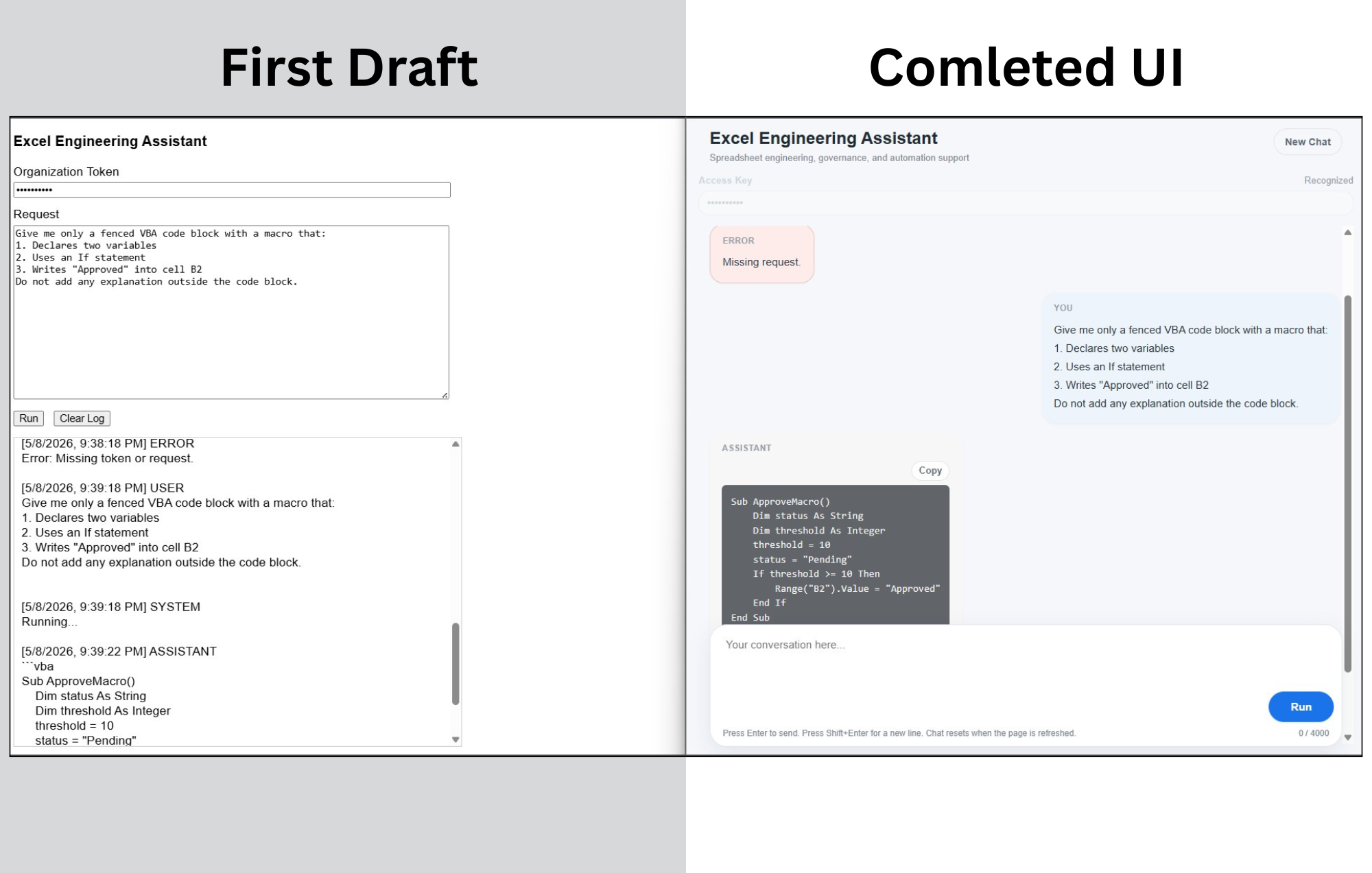
Best read as: public-safe AI workflow application support, strongest for applied workflow design rather than commercial SaaS or production-scale enterprise AI ownership.
Automated PTO Workflow System
Sole Solutions Architect and Principal Engineer for this local project
I independently architected, engineered, deployed, and maintained an API-connected Google Workspace system that orchestrates authenticated request intake, staffing-overlap checks, approval decisions, Calendar events, notifications, dashboard state, and threshold monitoring. It manages 100% of eligible local technician requests and has successfully processed more than 200 requests over nearly eight months.
Key implements - Apps Script service APIs: SpreadsheetApp, MailApp, CalendarApp, HtmlService | onFormSubmit(e) event processing | doGet(e) web-app decision endpoint | Scheduled monitoring | Forms, Sheets, email, and Calendar integration
Architecture, APIs, deployment, and result
- Situation
- The branch’s company-approved PTO application created local visibility and workflow limitations. I independently initiated a local operational layer to structure technician requests, staffing-overlap review, management decisions, Calendar coordination, notifications, and monitoring without replacing the company-wide platform.
- System architecture
- I integrated authenticated Google Forms intake with Sheets-based records, status tracking, dashboard totals, and alert memory. Apps Script coordinated event-driven processing through onFormSubmit(e), web-app approval and rejection actions through doGet(e), and scheduled sick-time monitoring through checkSickDayThreshold().
- API and service integration
- The workflow uses Google Apps Script service APIs including SpreadsheetApp for workbook state, MailApp for custom HTML notifications, and CalendarApp for approved all-day events. Installable and time-driven triggers connect Forms, Sheets, email, and Calendar into one controlled workflow.
- Deployment and result
- I validated the system in sandbox environments, led two phased production rollouts, trained management and technicians, managed production cutover, and retained sole technical change authority. The system now handles 100% of eligible local technician requests and has successfully managed more than 200 requests over nearly eight months.
- Specification layer
-
I reverse-engineered the production Automated PTO Workflow System into a public-safe technical specification that documents how the implemented workflow operates across Google Forms, Google Sheets, Apps Script service APIs, email, and Google Calendar.
The specification defines 38 functional requirements, 15 business rules, 20 acceptance criteria, component responsibilities, event flows, formulas, notification behavior, validation evidence, and requirements traceability.
As-implemented technical specification
A 25-page, as-implemented specification connecting the production system’s requirements to its architecture, data structures, Apps Script handlers, Google Workspace service integration, approval logic, Calendar behavior, notifications, dashboard state, monitoring rules, acceptance criteria, and verification evidence.
This artifact demonstrates my ability to reconstruct a working system into implementation-grounded documentation that supports requirements review, maintenance, testing, handoff, and future change decisions.
The specification supports technical business analysis, systems analysis, requirements reconstruction, acceptance-criteria development, traceability, and public-safe technical documentation. It does not establish enterprise architecture authority, regulated HRIS documentation, formal QA ownership, or enterprise SDLC governance.
Open the full technical specificationInspect the API-connected production workflow
These artifacts show the system at three connected levels: event-driven Apps Script processing, Google Workspace service API orchestration, and the operational outputs used by managers and employees. Together, they connect request intake and business rules to approval actions, Calendar events, notifications, dashboard state, and threshold monitoring.
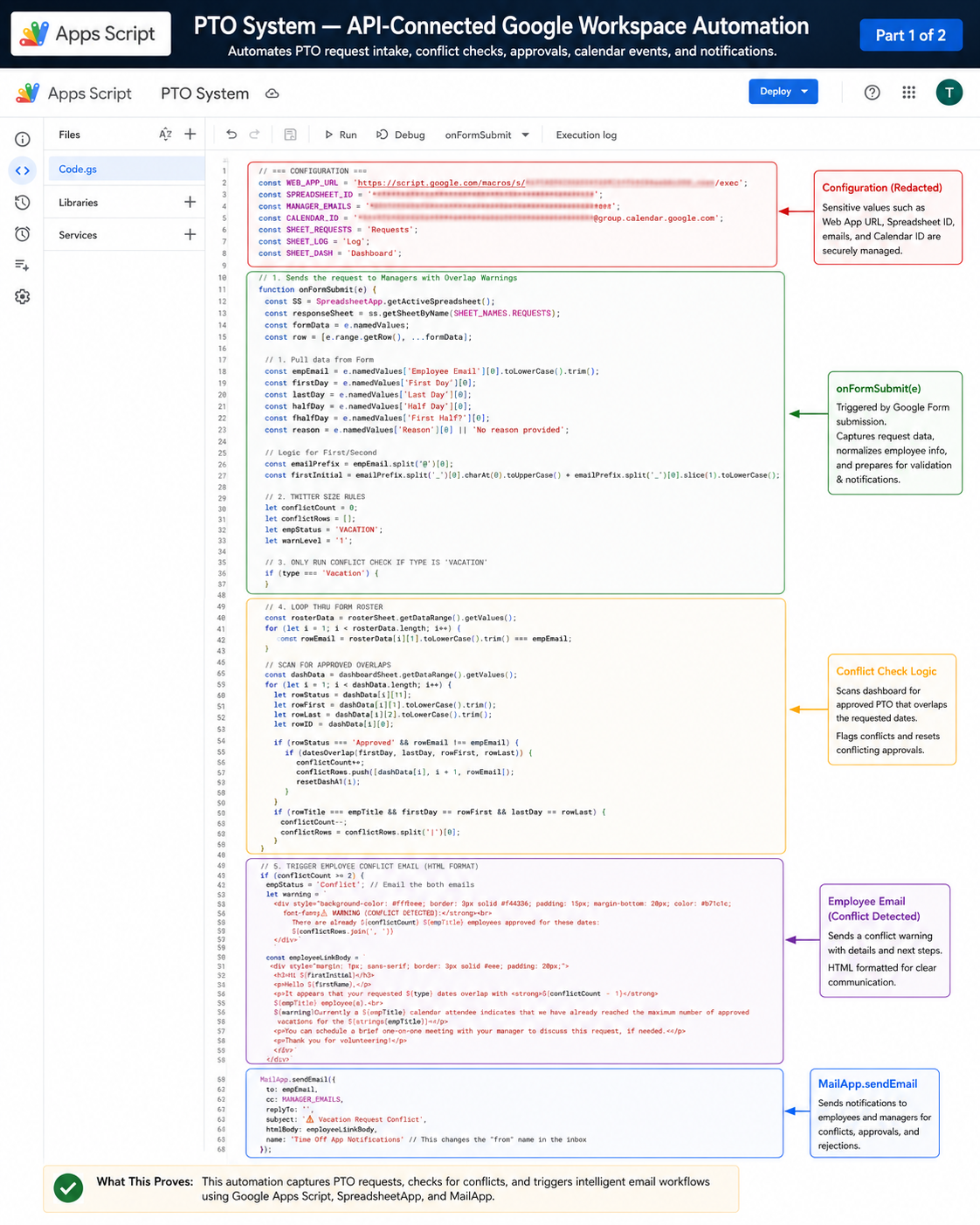
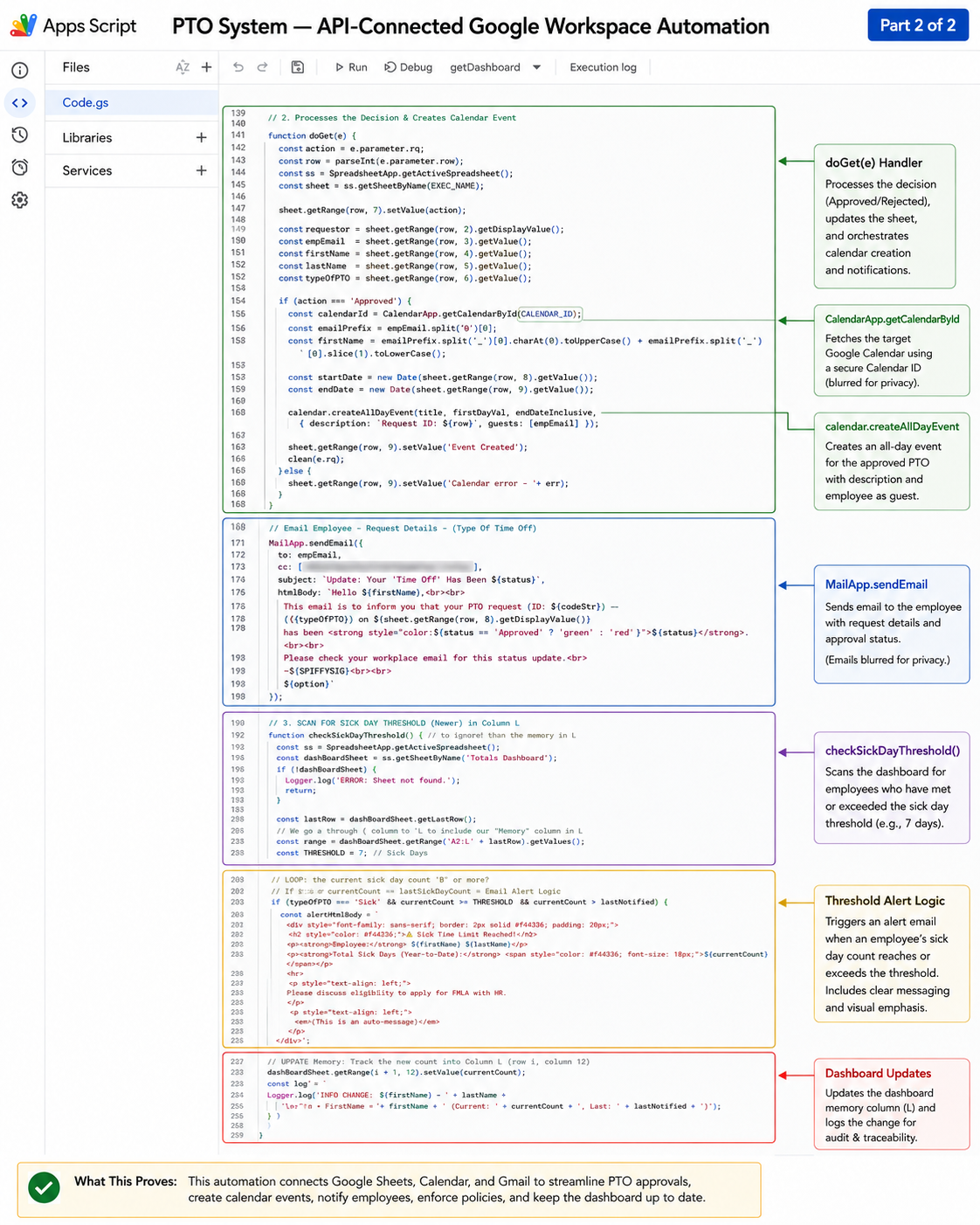
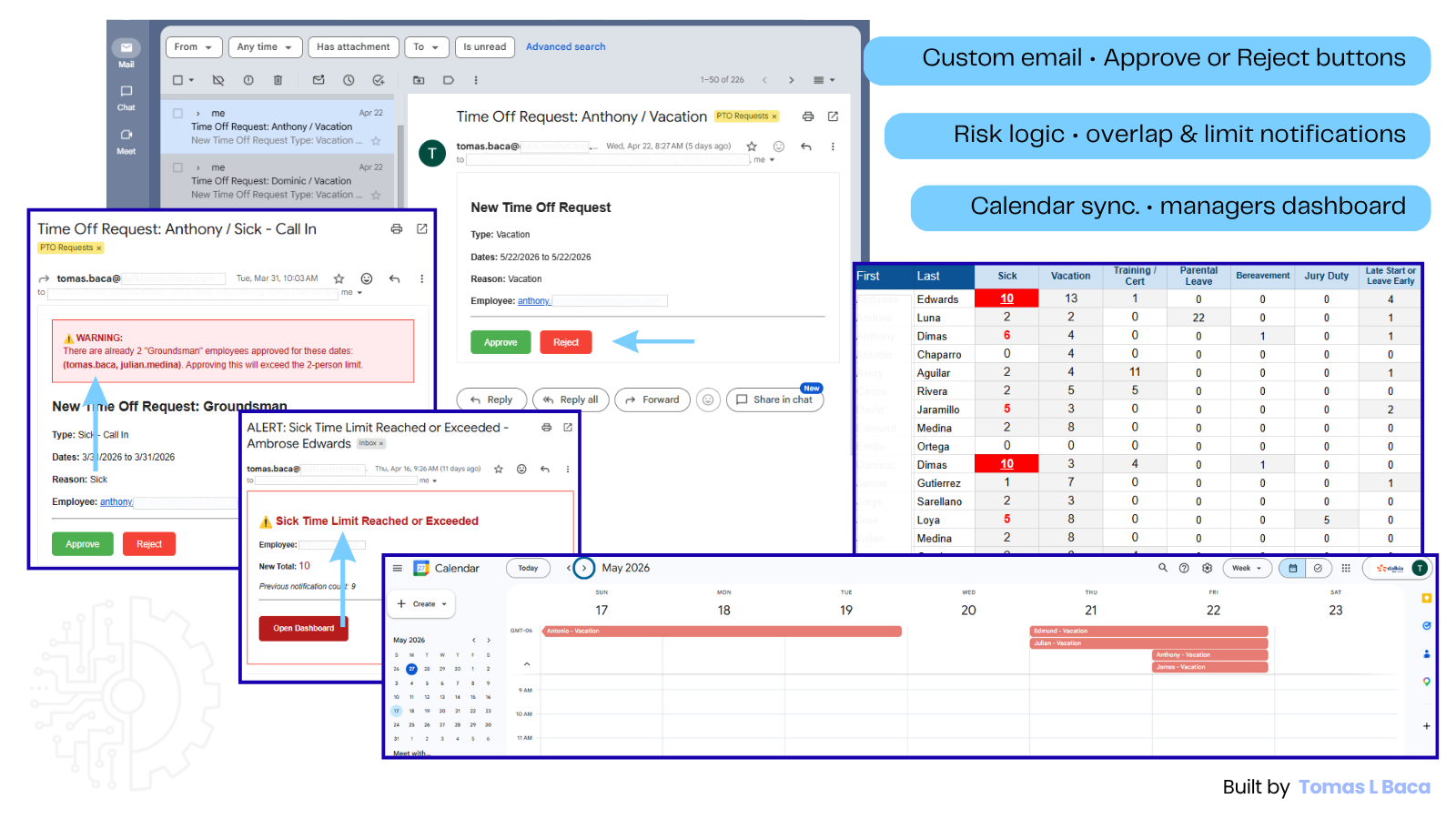
This evidence supports my project-level role as the sole Solutions Architect and Principal Engineer for the local Automated PTO Workflow System. It demonstrates API-connected Google Workspace automation, production deployment, user enablement, and ongoing technical ownership. It does not establish a formal employer title, company-wide PTO platform ownership, HRIS replacement, enterprise security maturity, exact OAuth-scope engineering, or formal CI/CD.
Gmail-to-Drive Report Ingestion
Built a Gmail-to-Drive automation that finds unread target report emails, extracts secure CSV download links, retrieves files with UrlFetchApp, saves them to structured Drive folders, marks threads processed, and logs execution results.
Key implements - GmailApp | UrlFetchApp | DriveApp
Build, tools, and result
- Situation
- Recurring operational reports required manual email search, CSV download, file renaming, Drive filing, and duplicate-handling discipline.
- System built
- GmailApp search-and-retrieval workflow that locates unread target reports, extracts secure CSV links, downloads files through UrlFetchApp, saves outputs through DriveApp, marks threads read, and logs results.
- Tools
- GmailApp, UrlFetchApp, DriveApp, Utilities, Logger, date-based file naming, structured Drive folders, and processed-thread handling.
- Result
- Created a repeatable report-ingestion workflow with execution logs showing successful CSV retrieval, Drive folder routing, processed-thread handling, and resolution of Gmail search-syntax constraints that initially blocked reliable matching.
Visuals and limits
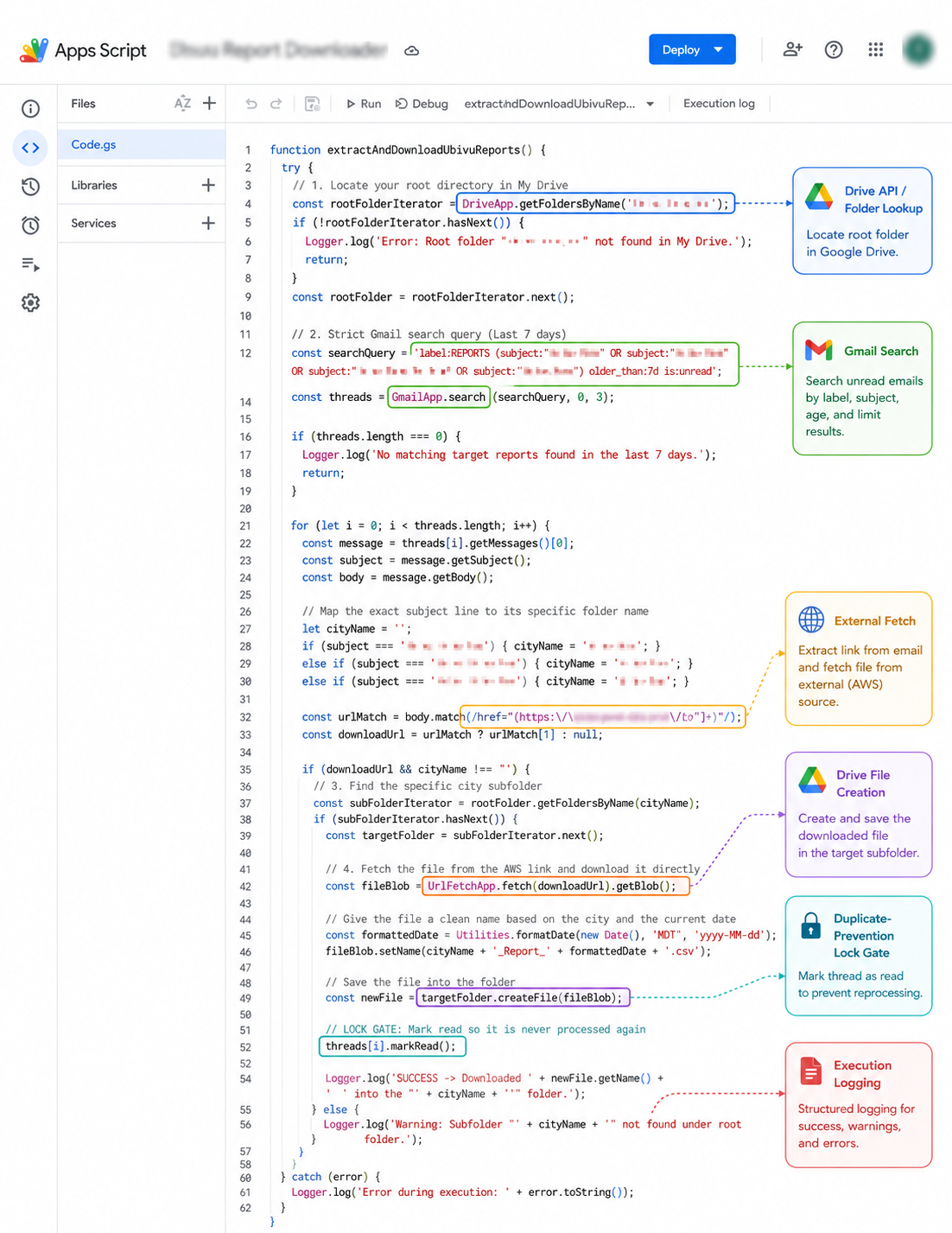
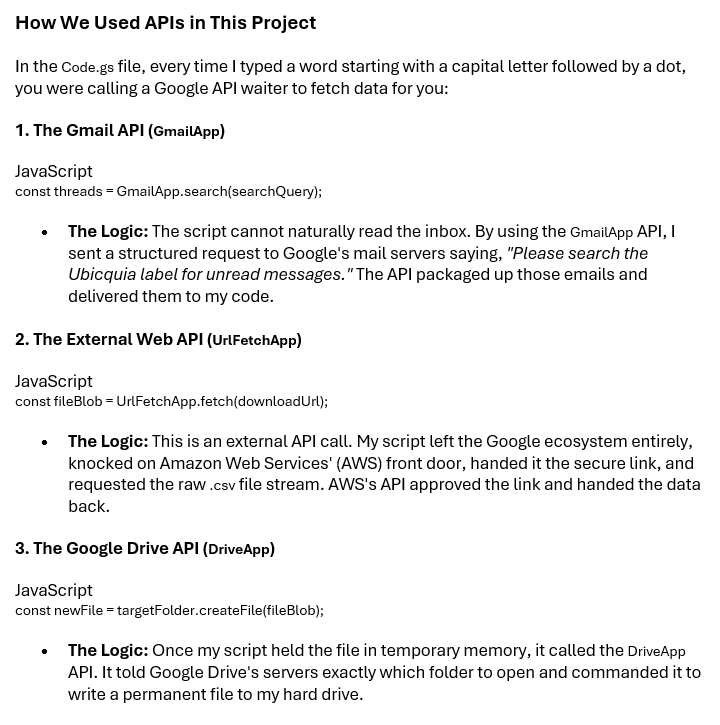
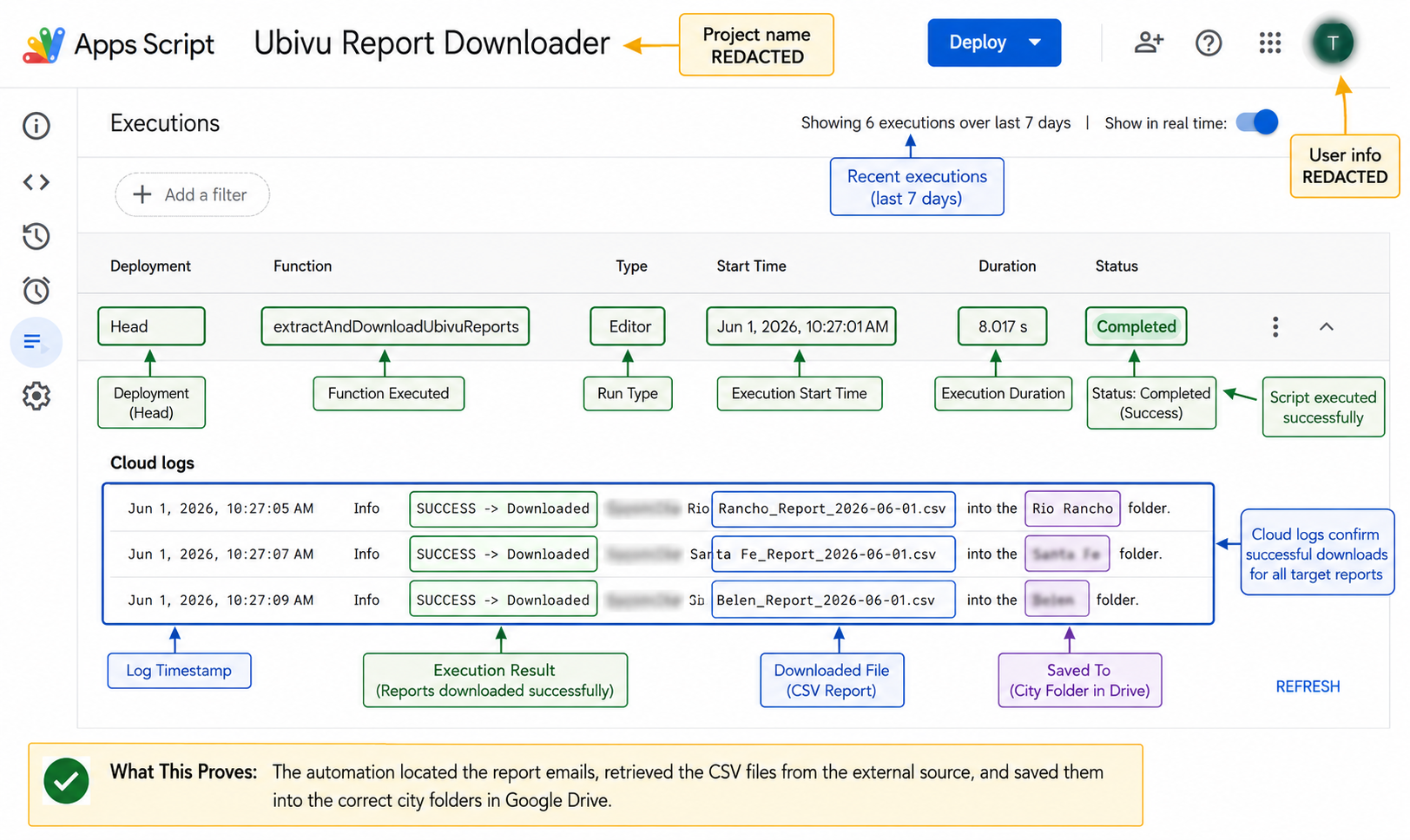
Best read as: report-ingestion automation using Gmail, UrlFetch, and Drive services rather than enterprise ETL, cloud data engineering, or AWS pipeline ownership.
TerraGo Asset Workflow Mapping
Translated field, dispatch, warehouse, material, and contract-management work into structured workflow documentation for a map-based asset management pilot.
Key implements - Visio | Workflow maps | Requirements translation
Product ownership, delivery, and result
- Situation
- Dalkia's Albuquerque operation needed the TerraGo web and mobile implementation to connect incidents, work orders, dispatch, technician execution, customer decisions, billing evidence, asset history, and material processes across multiple user groups and phased city operations.
- Product role and system design
- Served as Functional Technical Product Owner for the TerraGo web and mobile implementation. Owned product workflows, user-system interactions, feature priority, implementation sequence, scope decisions, testing direction, acceptance, release readiness, and migration preparation. Authored cross-functional workflows and test scenarios while directing product work across a four-person TerraGo engineering and implementation team. TerraGo engineers owned the underlying code and platform implementation.
- Tools and evidence
- Visio; Monday implementation records; TerraGo web and mobile walk-throughs; workflow and test-scenario artifacts; functional and acceptance testing; defect triage, correction verification, and Passed Testing decisions; Asset, Incident, and Material migration workbooks.
- Result and current state
- Established a traceable delivery chain from product requirement to engineering response, implementation, correction, retesting, and acceptance. Prepared three-city Phase 1 migration scope covering 10,715 assets. The implementation is in final production-build preparation and rollout testing for a scheduled September 1, 2026 rollout. Completed rollout, migration validation, production adoption, and quantified outcomes are not yet claimed.
Full workflow document
Six-page product-workflow record showing the end-to-end incident lifecycle and focused branches for completion, reclassification, road-block handling, dispatch review, and closure. It demonstrates workflow architecture and iterative product design. Separate implementation, testing, acceptance, meeting, and migration records support the broader Functional Technical Product Owner role.
Open full workflow PDFProduct workflow evidence and role scope
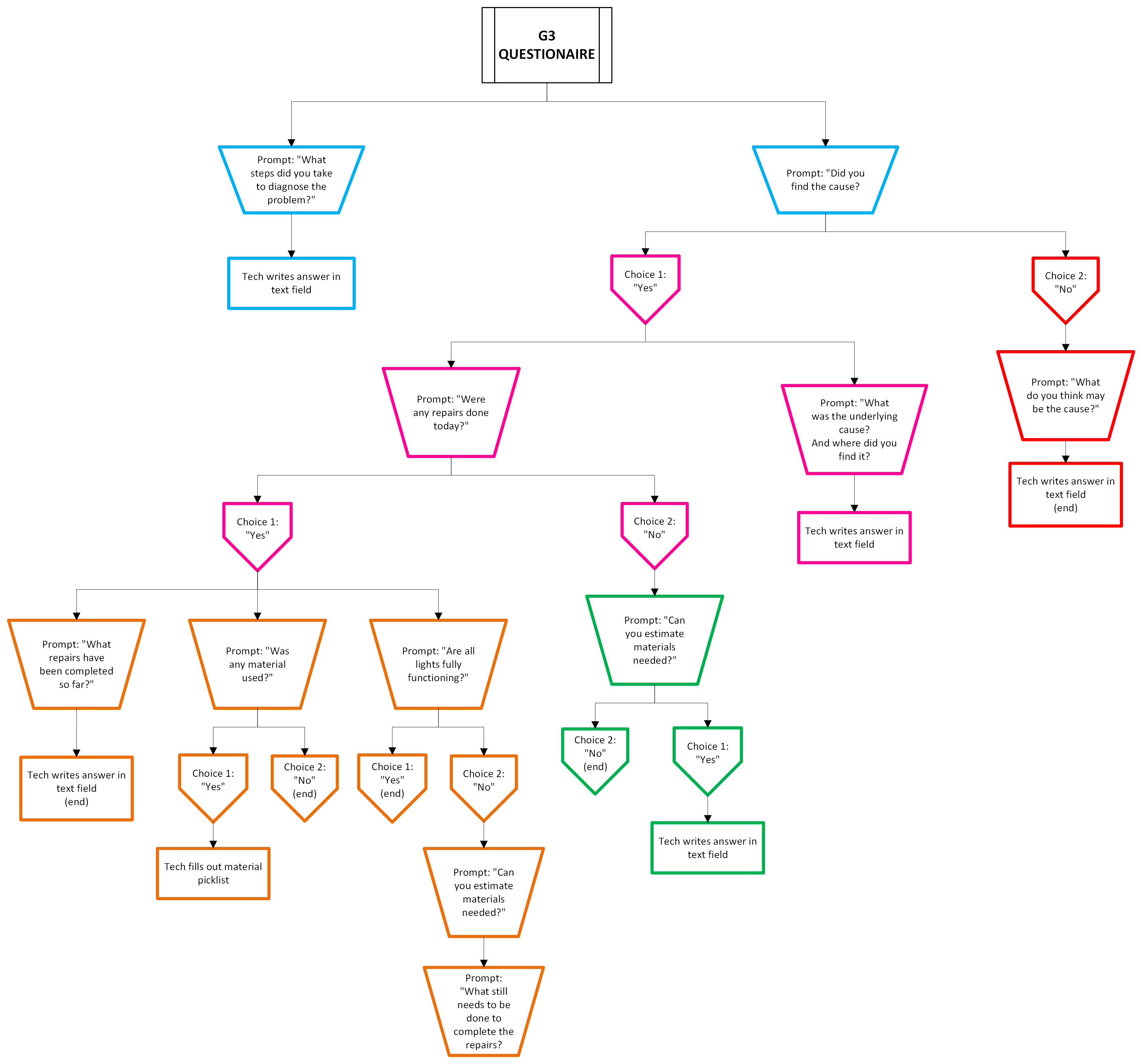
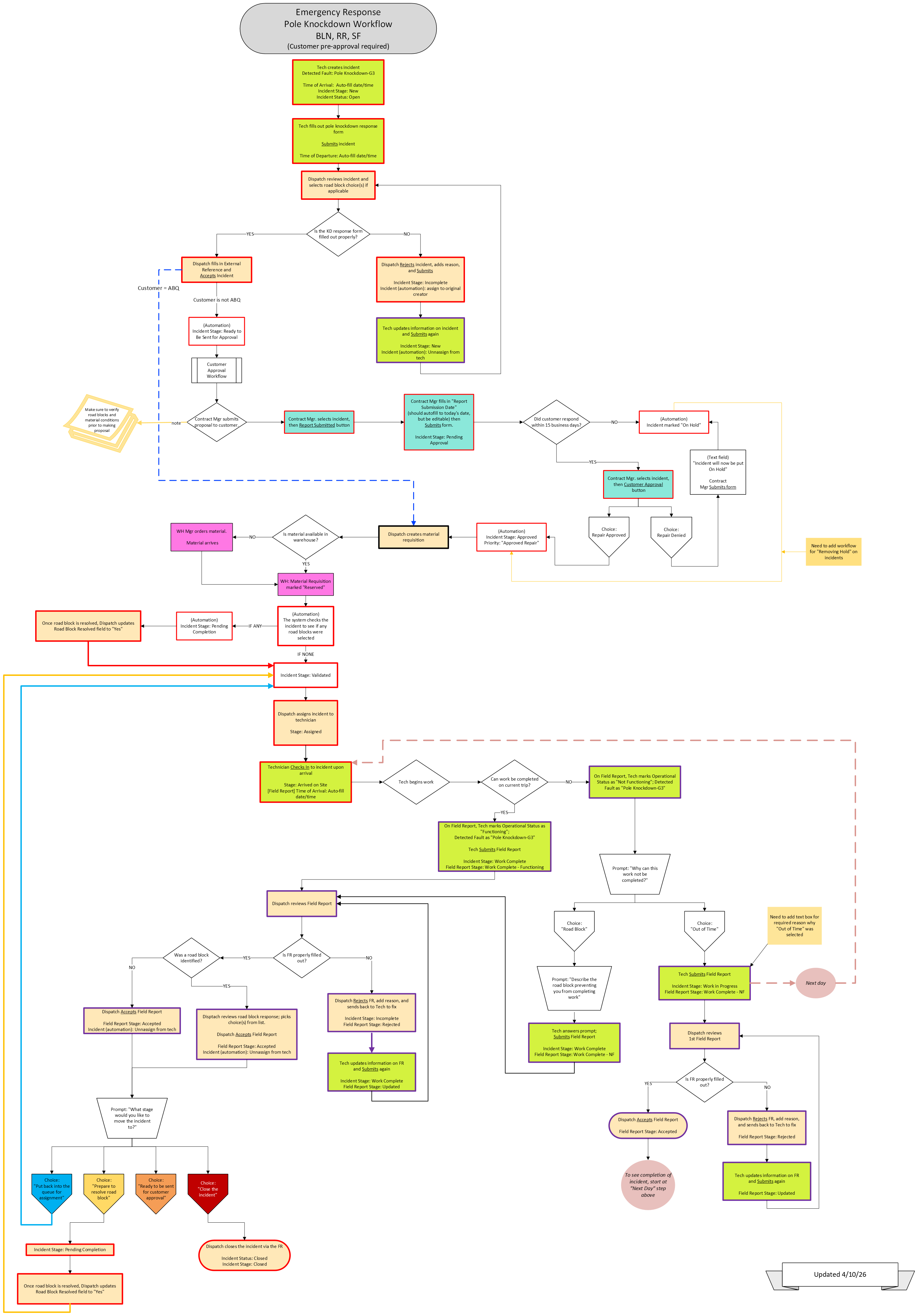
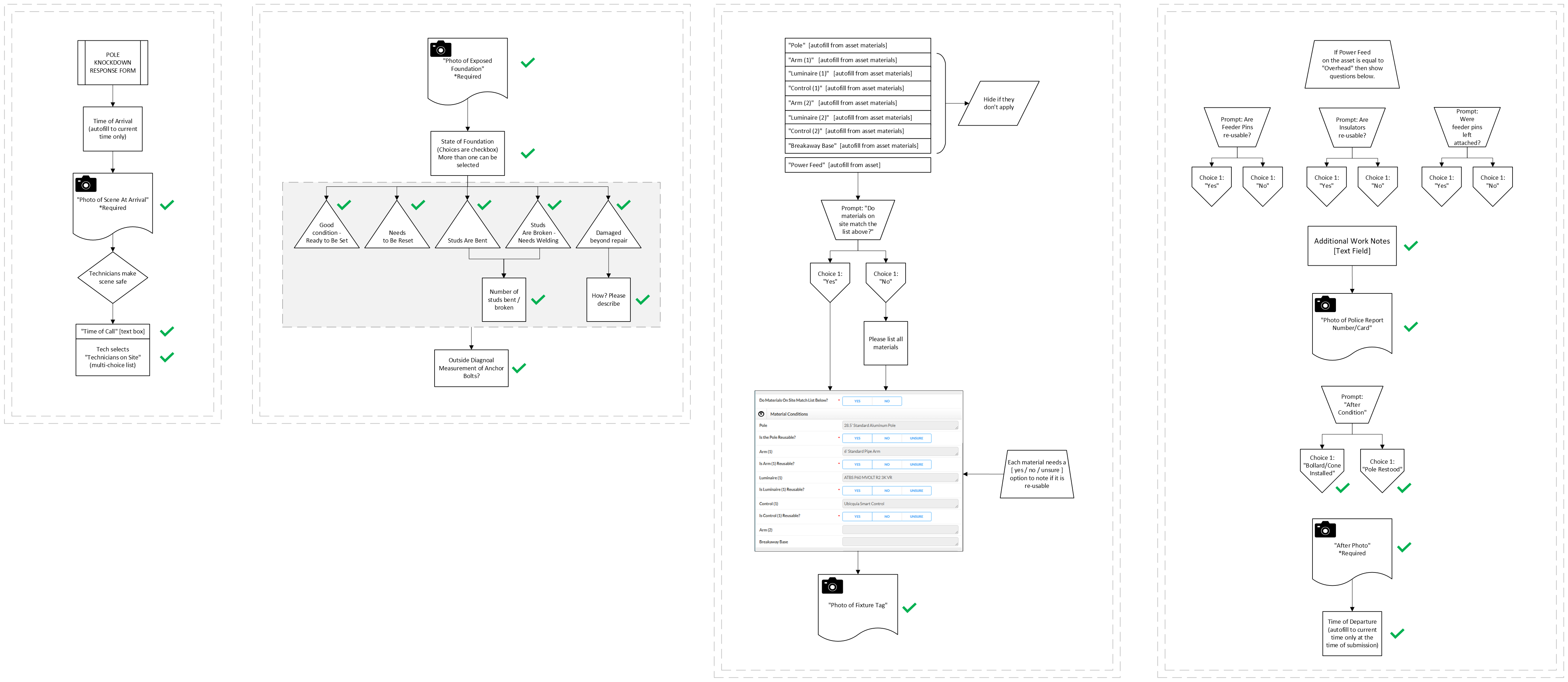
Best read as: visual evidence of the cross-functional product workflows, user interactions, decision states, exception paths, and implementation requirements Tomas authored as Functional Technical Product Owner for the TerraGo web and mobile implementation. Combined with the implementation threads, testing records, recurring walk-throughs, acceptance decisions, and migration workbooks, these records support product direction from requirements through correction and acceptance. TerraGo engineers own the underlying platform implementation and code; this is not a formal employer title, personnel-management claim, or completed-rollout claim.
Controlled LLM Operating System for Fulcrum Field-App Engineering
Sole Solutions Architect and Principal Engineer for this project
Starting with no prior Fulcrum app-building experience, I independently architected and deployed a two-layer Gemini system that converts official platform guidance and field-workflow requirements into controlled, stepwise app-building decisions. I used the system to design, publish, and mobile-test a functioning G3 Incident Report app while validating its usability, documenting procedural deviations, and preserving human authority over uncertain decisions.
Key implements: Two-layer Gemini architecture | 43-section operating manual | Source-confidence controls | Stop-and-verify execution | Published, mobile-tested G3 app
Architecture, controls, and proof
- Challenge
- Fulcrum-supported field work faced a knowledge-transfer risk while I had no prior app-building experience and was preparing to assume greater responsibility for the platform. I needed more than reference material: I needed a controlled environment that could translate field requirements and official documentation into reliable implementation decisions.
- Architecture
- I designed a two-layer LLM operating system from a blank page. A compressed Gemini instruction established identity, intake behavior, priorities, and control rules; a 43-section Markdown operating manual governed evidence handling, app-design logic, execution sequence, troubleshooting, output contracts, and failure prevention.
- Reliability controls
- The system classified unsupported conclusions as Assumption needing verification, stopped instead of filling gaps with plausible guesses, and required human confirmation before continuing. Additional controls included source-confidence labels, short implementation chunks, explicit stop points, technician-first design rules, structure-before-build guidance, and safeguards for modifying existing apps.
- Validation and result
- I used the deployed system to design, publish, and mobile-test a functioning G3 Incident Report app with controlled selections, Record Links, conditional workflows, repeatable materials, photos, labor estimates, work notes, and native statuses. I retained a test record, reviewed the mobile technician experience, documented two procedural deviations, and preserved final authority over every implementation decision.
Inspect the implementation evidence
Control layer → operating architecture → implemented and validated result
A 1,500-character platform ceiling forced the system into two layers: a compact runtime instruction for identity, authority, execution limits, source confidence, and human verification; and a detailed operating manual for the full behavior contract.
Open the deployed instructionI created this operating manual from a blank page to control how the Fulcrum Gem interprets requirements, distinguishes evidence from assumption, recommends app structures, guides implementation, stops for human confirmation, and responds when its guidance is uncertain or wrong.
Artifact story
This was not written as passive documentation after the system existed. It was designed as the Gem’s controlling execution layer.
Its 43 sections define how a session gathers sufficient context before acting; divides work into short, confirmable implementation steps; distinguishes platform facts, user-provided information, design judgment, and unresolved assumptions; prioritizes technician usability, clean data structure, reporting, and maintainability; selects field types, repeatable structures, conditional logic, photos, materials, and return-trip workflows; protects existing records and downstream processes; handles uncertainty, false confidence, skipped validation, and weak design decisions; and returns final authority to the human operator.
The structure makes the runtime architecture inspectable: identity first, interaction control second, evidence and risk controls next, implementation behavior after that, and reusable field-workflow logic last.
Suggested inspection path
Runtime control: Sections 3, 5, 6, 20, and 26
Structured intake, small execution chunks, response contracts, controlled build sequencing, and mandatory stop points.
Truth and reliability control: Sections 7, 10, 33, 34, and 35
Source-confidence classification, risk disclosure, knowledge boundaries, anti-failure rules, and direct correction behavior.
Field-system engineering: Sections 11–19 and 37–42
Workflow-first design, technician usability, field-selection logic, materials structures, return-trip logic, modification safety, and reusable implementation defaults.
Validation: Sections 25 and 43
Usable completion criteria and validation before continuation.
Proof statement
This artifact supports my project-level role as the sole Solutions Architect and Principal Engineer because it records the operating architecture, design priorities, reliability controls, implementation contracts, and validation rules I established for the system.
Evidence boundary
The manual proves the intended architecture and control design. It does not, by itself, prove perfect runtime compliance. Actual implementation is demonstrated through the published, mobile-tested G3 record.
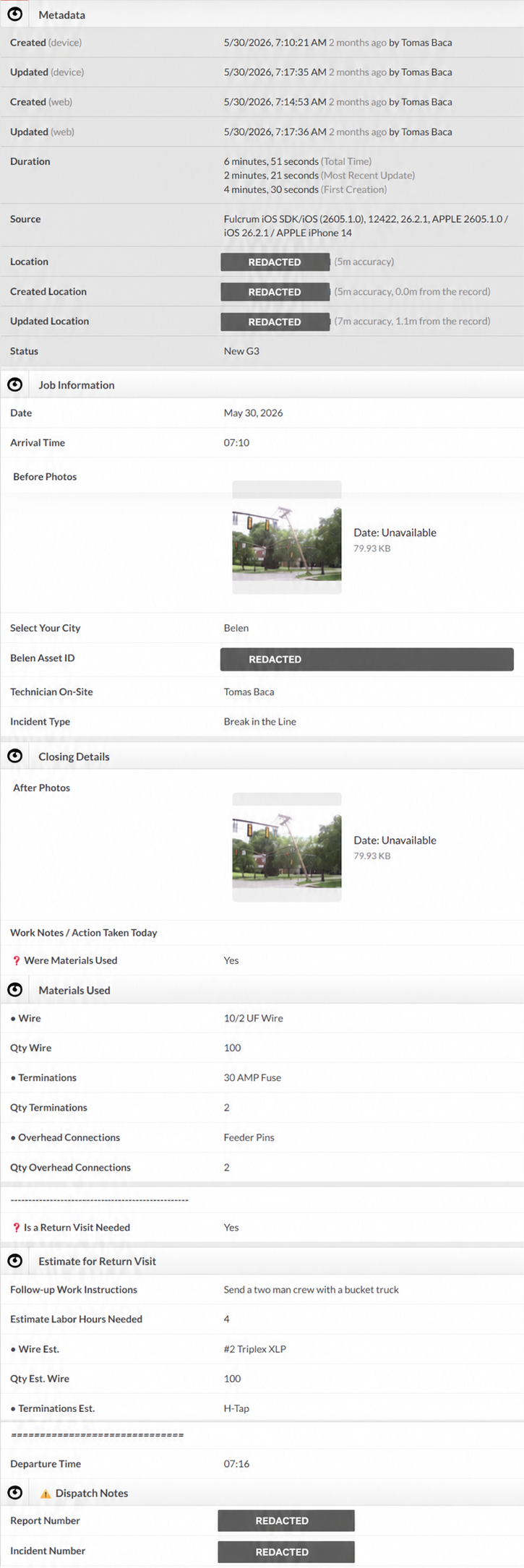
Open the 43-section operating manual Open the architecture mapThis retained Fulcrum record shows the system operating as a complete field workflow rather than a form-design exercise. It captures mobile creation and update metadata, location evidence, asset identification, technician activity, before-and-after photos, materials used, return-visit requirements, labor estimates, follow-up instructions, departure time, and dispatch reference fields in one structured record.
What the artifact shows
The record demonstrates that the G3 app could create and update a record from a mobile device; preserve timestamps, duration, source, and location metadata; link work to a city and mapped asset; identify the technician and incident type; capture separate before-and-after visual evidence; record multiple materials and quantities; trigger and expose return-visit fields only when required; capture follow-up instructions and estimated labor; preserve dispatch-facing reference information; and retain the completed test record for later inspection.
Proof statement
This artifact connects the Fulcrum Gem’s design guidance to an implemented result. The two-layer LLM system did not stop at recommendations: I used it to structure, publish, complete, and review a working G3 record on a mobile device.
Project-role connection
The artifact supports my project-level role as the sole Solutions Architect and Principal Engineer because it shows the implemented outcome of the requirements, data structure, technician workflow, conditional logic, validation rules, and deployment decisions I owned.
Evidence boundary
This record proves a functioning published prototype, mobile workflow completion, retained structured data, and direct validation. It does not prove technician adoption, dispatcher adoption, production rollout, training completion, or quantified operational improvement.
Project-level Solutions Architect and Principal Engineer authority is supported by the architecture, deployment, and validation evidence presented here. Production adoption, completed multi-user rollout, quantified time savings, and mature maintenance controls are not claimed.
Controlled Excel/VBA Workflow Builds
Built and evaluated Excel/VBA workflows for report cleanup, billing outputs, raw-data preservation, validation checks, source/output separation, and failure-mode analysis.
Key implements - Excel 365 | VBA macros | Failure analysis
Build, tools, and result
- Situation
- Recurring spreadsheet work needed cleaner transformations, preserved source data, repeatable outputs, and visible checks before relying on AI-assisted automation.
- System built
- Controlled Excel/VBA builds for report cleanup, billing outputs, source-data preservation, row integrity, validation checks, source/output separation, and failure analysis.
- Tools
- Excel 365, VBA macros, header-based mapping, conditional formatting, source/output separation, validation review, and SDET-style analysis.
- Result
- Produced working Excel/VBA transformation records while documenting validation gaps, unresolved limitations, and failure risks instead of overstating build completeness.
Visuals and limits
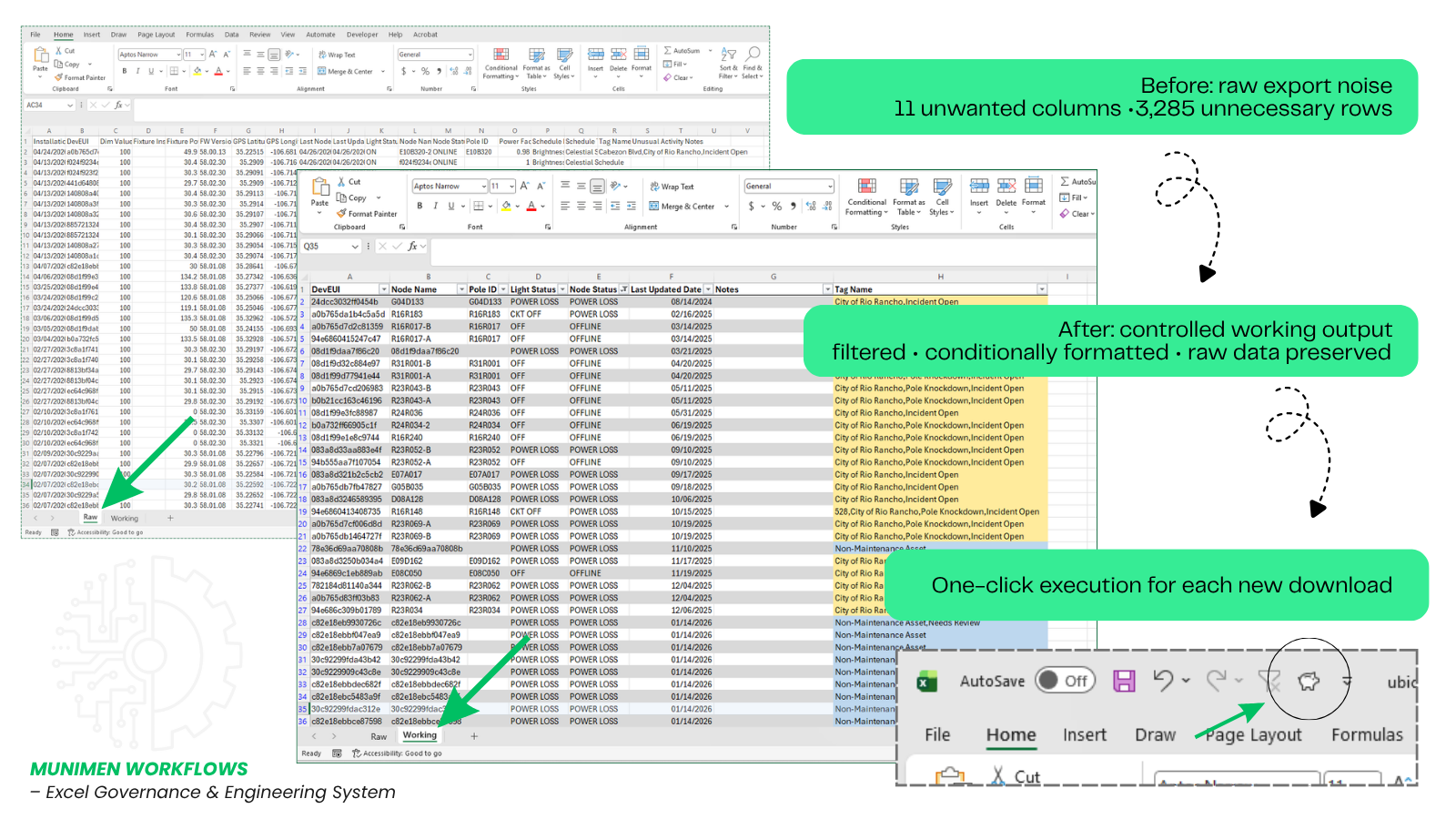
Best read as: controlled builds and review materials, strongest for spreadsheet workflow reliability rather than fully hardened production systems or formal SDET employment.
Recruiter Evidence Research Site and AI Assistant
Built this public proof architecture and OpenAI-backed recruiter research experience to make nontraditional applied AI, automation, systems, and documentation work easier to inspect than a text resume.
Key implements - OpenAI API | Netlify Functions | JSON schema | Grounding payload | Claim Proof Audit | Public-safe records
Build, tools, and result
- Situation
- Resume claims alone were not enough to show nontraditional applied AI and automation work before a recruiter or hiring manager lost context.
- System built
- Public portfolio site with role-fit framing, project cards, visual records, a deterministic job-description checker, a live OpenAI-backed Recruiter Research Guide, grounding payloads, response-quality reviews, Claim Proof Audit behavior, and deployment safeguards.
- Tools
- HTML, CSS, JavaScript, Netlify Functions, OpenAI Responses API, structured grounding payloads, JSON-shaped responses, output normalization, deterministic fallback behavior, custom domain deployment, response testing, and local AI safety validation.
- Result
- Created a recruiter-facing research experience where a reviewer can move from concern to review path, compare claim support, inspect limits, and carry a cleaner hiring-manager handoff.
Visuals and limits
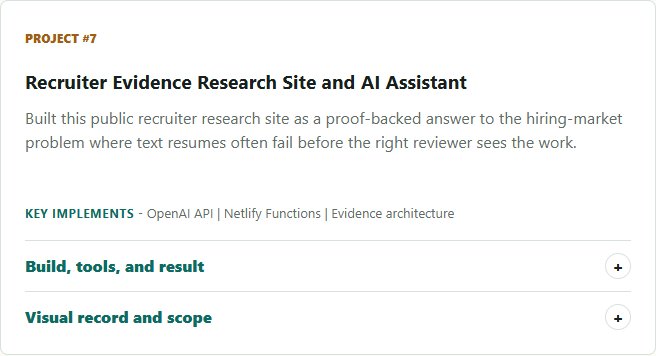
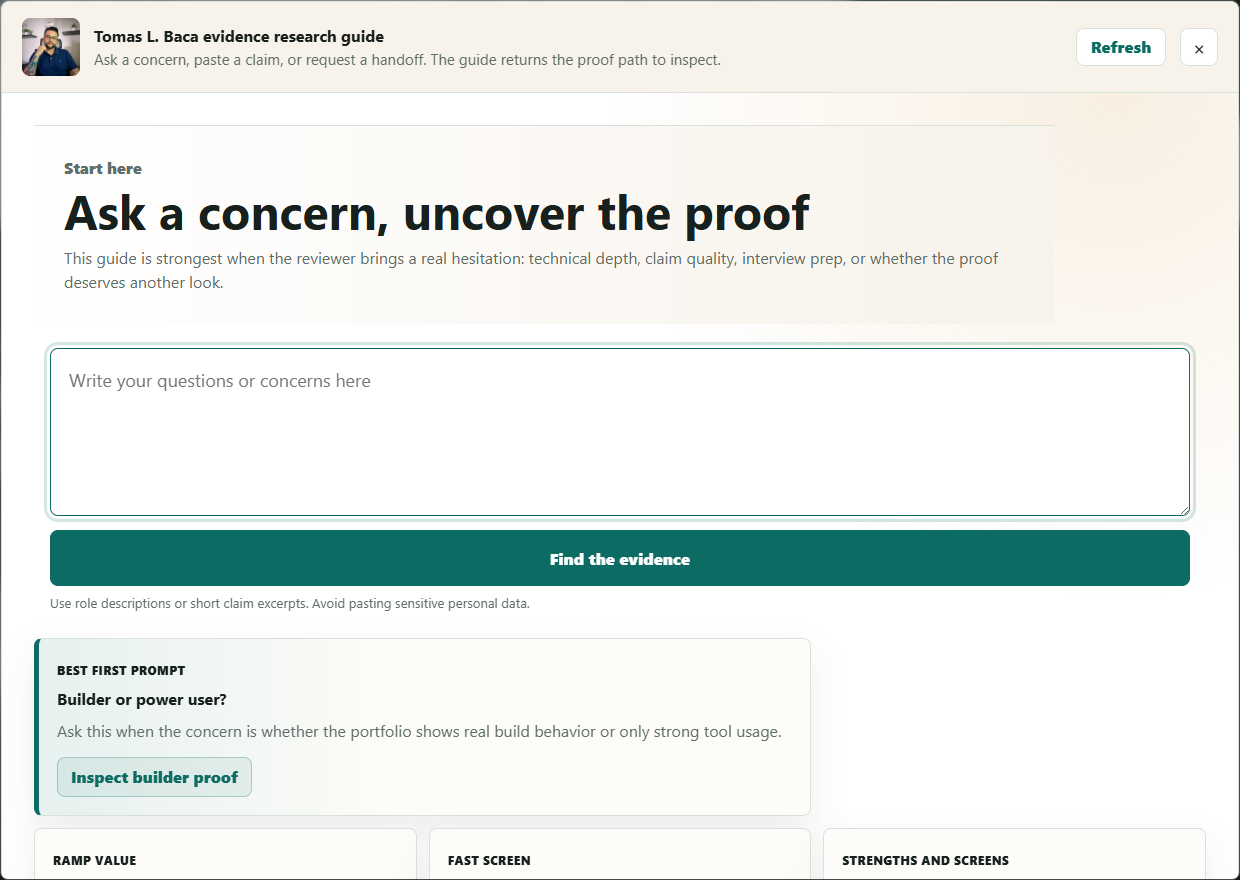
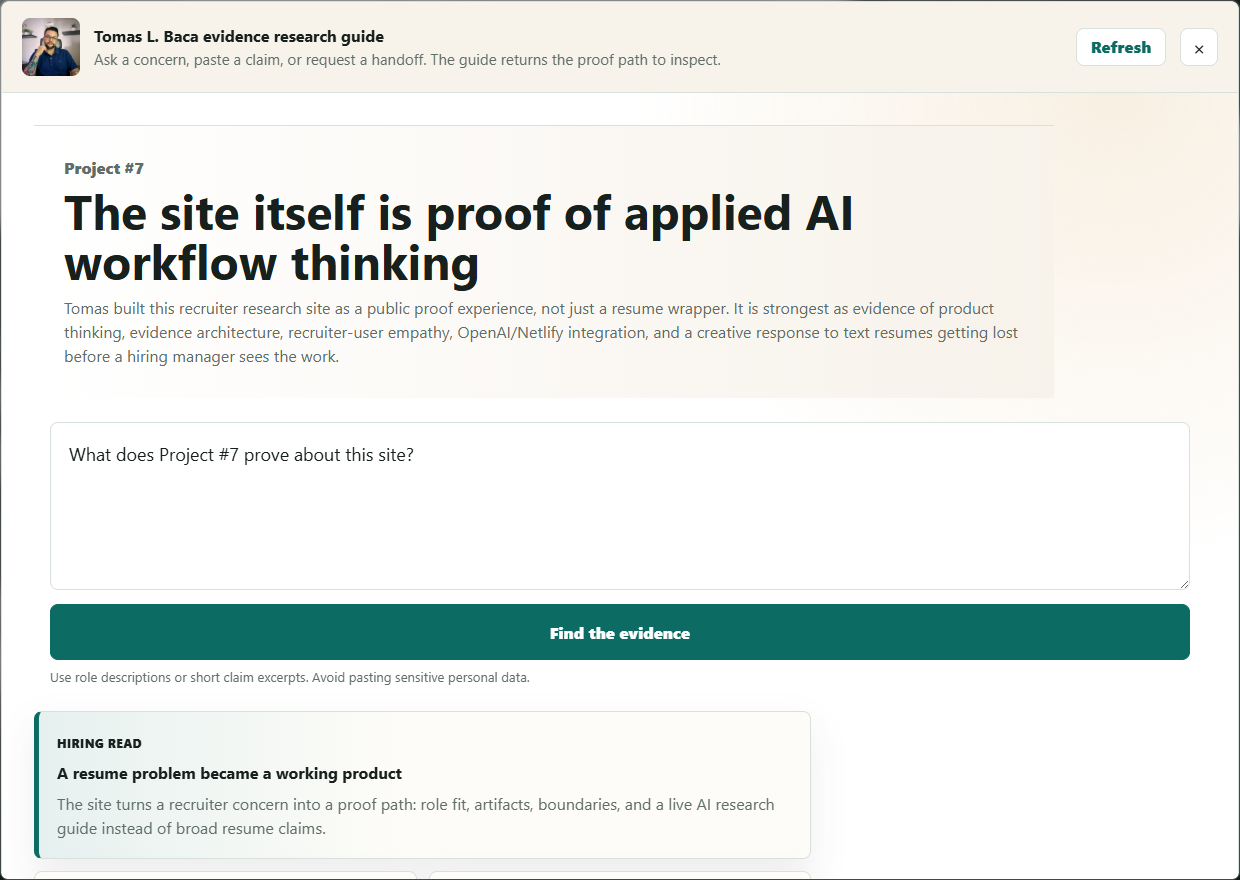
Best read as: public AI proof architecture, recruiter-facing evidence systems, applied AI workflow design, Netlify/OpenAI integration, product thinking, deployment follow-through, and response-quality review rather than enterprise SaaS, production-scale traffic, advanced cybersecurity, human-screening replacement, or senior full-stack engineering claims.
Role assessment
Paste a job description and compare its responsibilities against verified project authority, technical work, product delivery, and evidence limits on this page.
Job description assessment
Paste a role and review the evidence match.
The assessment separates direct evidence, transferable fit, project-specific role authority, and requirements that still need separate verification.
VALUE TO THE TEAM
Built for teams that need operational complexity converted into controlled, working systems.
I bring operations leadership, API-connected automation, and applied LLM workflow design into environments where approvals, reporting gaps, field data, spreadsheets, and undocumented process knowledge create operational risk.
My value is translating how work actually happens into systems with explicit decisions, observable state, human validation, reliable handoffs, and evidence-backed limits.
What I can help build
- API-connected Google Workspace systems for intake, approvals, notifications, Calendar synchronization, dashboards, and scheduled monitoring
- Domain-specific LLM operating systems with structured intake, source-confidence controls, and stop-and-verify behavior
- Excel/VBA and reporting workflows with source-data preservation and validation controls
- Field-data and asset workflows designed around technician usability and clean data structure
- As-implemented technical specifications connecting requirements, business rules, service integration, acceptance criteria, and evidence
Where I create leverage
- Converting undocumented operational requirements into architecture and executable workflow logic
- Connecting existing platforms and service APIs before overbuilding larger systems
- Designing validation gates, state visibility, human review, and failure controls into AI-assisted work
- Carrying systems from requirements through testing, deployment, user enablement, and maintenance
- Producing inspectable evidence that shows what a system proves and where its limits remain
How I work
I begin with operational reality: who uses the system, where the workflow fails, what information must survive, which decisions require visibility, and what must be verified before an output can be trusted.
The Automated PTO Workflow System demonstrates API-connected production automation carried through rollout and maintenance. The Fulcrum Field App Builder Gem demonstrates controlled LLM architecture translated into a published, mobile-tested field workflow. Together, they show how I move from operational need to governed implementation without overstating maturity or scale.
AI-driven recruiter research guide
The recruiter research guide advantage

Tomas L. Baca research guide
Evidence guide ready
Ask the portfolio where to look next
Type a concern, test a claim, or generate a hiring-manager handoff. The guide returns a sharper review path instead of asking you to hunt through the page again.